
Create a Facebook application like “Friend interview” – Step 2
In step 1 you learned how to authenticate and select a random friend of yours.
In this second part you will learn how to get more information about your friends and how to post the answer on their wall.
This is what you will get:
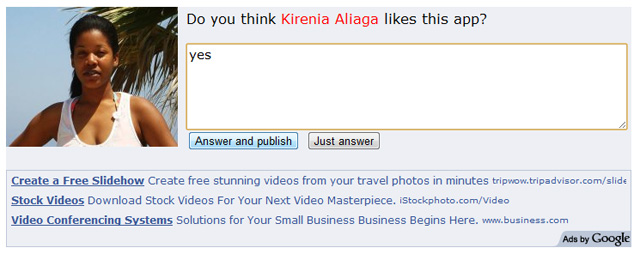
and once you hit “Answer and publish” you will post on your friend’s wall this way:
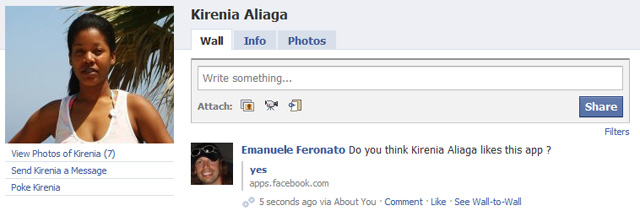
You need to know how cURL works. I may consider publishing a tutorial about cURL if I have enough requests.
Let’s jump straight to the code:
1 2 3 4 5 6 7 8 9 10 11 12 13 14 15 16 17 18 19 20 21 22 23 24 25 26 27 28 29 30 31 32 33 34 35 36 37 38 39 40 41 42 43 44 45 46 47 | <?php include_once "facebook.php"; $facebook = new Facebook(array('appId'=>'157934074246374','secret'=>'onceiwasapornsuperstar','cookie'=>true,'domain'=>'gamesalsa.com')); $session = $facebook->getSession(); if(!$session){ $url = $facebook->getLoginUrl(array('canvas'=>1,'fbconnect'=>0,'req_perms'=>'publish_stream','next'=>'http://apps.facebook.com/about_you_game/','cancel_url'=>'http://apps.facebook.com/about_you_game/')); echo "<p>Redirecting to permission request...</p>"; echo "<script type=\"text/javascript\">top.location.href = '$url';</script>"; } else{ if($_POST[to_do]=="Answer and publish"){ $ch=curl_init(); curl_setopt($ch, CURLOPT_URL, "https://graph.facebook.com/$_POST[user]/feed"); curl_setopt($ch, CURLOPT_RETURNTRANSFER, 1); curl_setopt($ch, CURLOPT_POST, 1) ; curl_setopt($ch, CURLOPT_POSTFIELDS, "access_token=$session[access_token]&message=".urlencode("Do you think $_POST[name] likes this app ?")."&link=".urlencode("http://apps.facebook.com/about_you_game/")."&name=".urlencode($_POST[answer])); $result = curl_exec($ch); curl_close($ch); } $friends = $facebook->api('me/friends'); $number_of_friends = count($friends[data]); $random = rand(0,$number_of_friends-1); $friend_id = $friends[data][$random][id]; $friend_name = $friends[data][$random][name]; $img = "http://graph.facebook.com/$friend_id/picture?type=large"; } ?> <!DOCTYPE html PUBLIC "-//W3C//DTD XHTML 1.0 Transitional//EN" "http://www.w3.org/TR/xhtml1/DTD/xhtml1-transitional.dtd"> <html xmlns="http://www.w3.org/1999/xhtml"> <div style = "width:513px;background-color:#edeff4;background-image:url('<?php echo $img; ?>');background-repeat:no-repeat;padding:5px 5px 5px 210px;font:normal 16px verdana"> Do you think <span style = "color:red;fnt-weight:bold"><?php echo $friend_name; ?></span> likes this app? <form method = "post" style ="margin-top:20px"> <textarea name = "answer" style = "border:1px solid #bdc7d8;width:100%;height:100px;font:normal 15px verdana"></textarea> <input type = "hidden" name = "user" value = "<?php echo $friend_id;?>" /> <input type = "hidden" name = "name" value = "<?php echo $friend_name;?>" /> <input type ="submit" value = "Answer and publish" name ="to_do"/> <input type ="submit" value = "Just answer" name ="to_do"/> </form> </div> </html> |
Obviously I won’t comment HTML, so let’s dive into php exploring the new lines not already explained in step 1.
Line 10: getting the login url with some new parameters:
next: the url to go to after a successful login
cancel_url: the url to go to after the user cancels
req_perms: comma separated list of requested extended perms
I am asking for publish_stream permission. It enables your application to post content, comments, and likes to a user’s stream and to the streams of the user’s friends. That’s what I need to publish something on my friends’ wall.
You can find the full docs about permissions at this official page.
Line 15: I am about to publish the answer about a random friend if the user clicked on “Answer and publish” button (line 43)
Line 16: initializing a cURL session
Line 17: setting the URL where to send the cURL request
Line 18: saving the result of the cURL session in a string
Line 19: setting cURL method to POST
Line 20: the core of the script: the variables to be passed in POST.
access_token: the authorization token.
message: the URL encoded message (“Do you think xxx likes this app?”)
link: the link to the application
name: the answer to the question
Line 21: executing the cURL session
Line 22: closing the cURL session
The big profile image on the left of the question can be obtained at line 29.
Test the application at this page.
Next time, generating and saving random questions.


(4 votes, average: 4.75 out of 5)


This post has 18 comments
Ivo Pereira
a cURL Tutorial will be very welcome! =)
Nice work!
Michael Greeno
Thanks for this post I really find it helpful as you are one of the first to really demonstrate a facebook application utilizing some of the new methods that facebook is using now instead of the REST API. I am currently still learning cURL and honestly I find it quite useful and if you did a post about I know many people would benefit from it. I love your site great work.
Jason Green
I am really excited about doing something with Facebook, thanks for this tutorial. I would love to see a cURL tutorial too.
Chip
Great read as always! I would love to see a post about cURL as well :)
saket
Emanuele I am a novice…I just get a blank screen for both of your hello world as well as friend interview scripts.An echo statement before including facebook.php gets rendered but not after it…plz help me figure this out.
thanx
hadadjus
please haw can i get the friend user name without using php this is my app http://apps.facebook.com/writing-upside/
Robin
Hi.
I’m having trouble finding the documentation for facebook php library.
Example: getLoginUrl, you send an array with the parameter req_perms in your code, but how do I know what permissions are available?
Robin
Sorry didn’t read your entire post
Dominic
Definately some of the better tutorials going. Yours are clear and easy to follow. I would certainly like to see a cURL tutorial.
Dario
Its not posting :-( damn, and it looked so promising. The API is changing to fast i guess
Dario
nope, it is but to friend wall, as it should :-) my bad.
Im trying to post to mine, and got tangled.
Mike
cURL tutorial would be awesome!!
Rafael Ramos
GREAT TUT!!
THANK YOU :)
Sadly it’s not posting in user’s wall. i dunno why..
Any help please ?
Luis Lopez G.
When will the third part will be available for us? Just wondering, I’m very excited about my first app of Facebook.
Chung Xa
Seems you are using Facebook API for PHP. So why didn’t you use
$result = $facebook->api(“/me/feed”, ‘POST’, array(‘message’ => $_POST['message'], ‘access_token’ => $session[access_token]));
instead of using Curl?
sephiroth
Awesome tutorial.
I was using facebook-actionscript-api and now i’m starting to experimenting with php client library so your tutorial is timed perfectly.
Ray
Wow, amazing tutorial! I was looking for an option to post to a random friend! and found it!
I’m still learning all that facebook app stuff and codes..
I have a question, is it possible to post to a multipe random friends using this code?
Waiting for your answer!
Thanks!
K
You are using following URL to display answer to individual friend’s feed/wall:
curl_setopt($ch, CURLOPT_URL, “https://graph.facebook.com/$_POST[user]/feed”);
What if we want to display it to all users?
&
What if we want to display it to selected members from all listed members?
Please help me in that.
Thanks
K