

Create a Facebook application like “Friend interview” – Step 3
Talking about Facebook and Php.
Here we go with the 3rd step. In this tutorial you will learn how to publish a full featured feed post to your friends’ wall, and to handle “umlauts” characters like “äöü” for the pleasure of our German readers, and for every user who has friends whose names contain special characters.
This is the kind of feed you are going to publish:
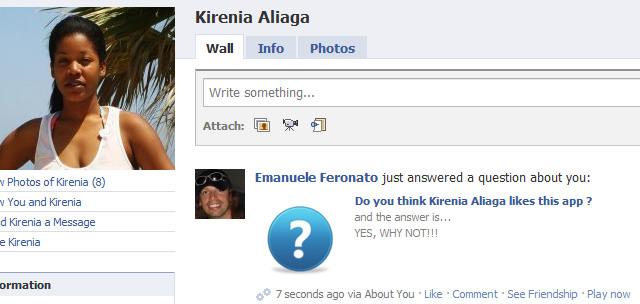
And this is the link of the application, just in case you want to have a look: About you Facebook application
The code is almost similar to the one we used in step 2:
'157934074246374','secret'=>'dontstealmysecretkey','cookie'=>true,'domain'=>'gamesalsa.com'));
$session = $facebook->getSession();
if(!$session){
$url = $facebook->getLoginUrl(array('canvas'=>1,'fbconnect'=>0,'req_perms'=>'publish_stream','next'=>'http://apps.facebook.com/about_you_game/','cancel_url'=>'http://apps.facebook.com/about_you_game/'));
echo "Redirecting to permission request...
";
echo "";
}
else{
if($_POST[to_do]=="Answer and publish"){
$ch=curl_init();
curl_setopt($ch, CURLOPT_URL, "https://graph.facebook.com/$_POST[user]/feed");
curl_setopt($ch, CURLOPT_RETURNTRANSFER, 1);
curl_setopt($ch, CURLOPT_POST, 1) ;
curl_setopt($ch, CURLOPT_POSTFIELDS, "access_token=$session[access_token]&message=".urlencode("just answered a question about you:")."&link=".urlencode("http://apps.facebook.com/about_you_game/")."&picture=".urlencode("http://www.gamesalsa.com/aboutyou/about_you_icon.png")."&name=".urlencode("Do you think $_POST[name] likes this app ?")."&caption=".urlencode("and the answer is...")."&description=".strtoupper(urlencode($_POST[answer]))."&actions=".urlencode("{\"name\": \"Play now\", \"link\": \"http://apps.facebook.com/about_you_game/\"}"));
$result = curl_exec($ch);
curl_close($ch);
}
$friends = $facebook->api('me/friends');
$number_of_friends = count($friends[data]);
$random = rand(0,$number_of_friends-1);
$friend_id = $friends[data][$random][id];
$friend_name = $friends[data][$random][name];
$img = "http://graph.facebook.com/$friend_id/picture?type=large";
}
?>
Do you think likes this app?
Using proper html tags such as http-equiv at line 38 allow us to properly render special characters, while the key of this post is line 20, where we pass a lot more information than in step 2.
Let’s see it in detail:
access_token: it’s the access token required to publish on friends’ wall. Its value must be
$session[access_token]
message: it’s the message which will appear next to your name. I used
urlencode("just answered a question about you:")
because I wanted my friend to see “Emanuele Feronato just answered a question about you:”. I also used urlencode although it’s useless in this case, just not to forget to encode the string should I change it in the near future with another string with some special characters.
picture: the absolute URL of the picture to display on the left of your post.
urlencode("http://www.gamesalsa.com/aboutyou/about_you_icon.png")
name: it’s the name of the link you are publishing in the feed. This is where we will place the question.
urlencode("Do you think $_POST[name] likes this app ?")
link: it’s the link attached to the picture and the name. You may want to use the URL of the application itself.
urlencode("http://apps.facebook.com/about_you_game/")
caption: the caption of the link, placed just under the link itself. Don’t write anything important here as it won’t be noticed that much since the blue color of the link grabs almost all attention. Perfect to write something like “and the answer is…”
urlencode("and the answer is...")
description: it’s the description of the link and it’s the longest text you can enter. We’ll place the answer there.
strtoupper(urlencode($_POST[answer]))
actions: you can also add a custom action to the action footer of the post (where you can find “Like”, “Comment”, and so on). Actions should be added as a JSON list containing “name” and “link”
urlencode("{\"name\": \"Play now\", \"link\": \"http://apps.facebook.com/about_you_game/\"}")
And here you, go, have a try with the application: About you Facebook application.
Never miss an update! Subscribe, and I will bother you by email only when a new game or full source code comes out.