Case study: Pixel City Skater, an iPhone game made with Flash

Do you remember Christian Östman and his Flash 3D game A Small Car?

He’s back with Pixel City Skater, a free (for a limited time) game for iPhone made with Flash and AS3.
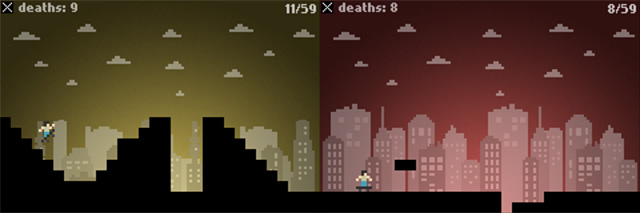
As usual, he shares his experience with us:

Pixel City Skater is the first iPhone game we’ve made. We wanted to try and see if it was possible to use Flash and AS3 to create a game for iOS and get it to the market. Using Adobe Air 2.6 it’s possible to create an iOS Application from your AS3-projects. While Air 2.7 is just around the corner, adding Flex-support and increased performance we didn’t have access to a pre-release of it so 2.6 had to do. As we didn’t have alot of time for the project we needed a very simple game-idea that could be done in pretty much a day. After some quick testing we decided on a small one-button game with a skateboarder.

To make the game we used Flash Builder 4.5 and the Flixel frameweork. It seemed like a good idea as it uses blitting to draw everything on screen to a bitmapdata, making it very suitable for mobile devices. It also made it pretty easy to support the different resolutions for the iPhone4 and the older models.The way we do it is simple, the game is running at half the standard iPhone resolution, 120×240. All the graphics and bitmaps is designed for that size. When the game loads we do a check (using the Capabilites class) what resolution the device we’re running on has. If it’s 320*480 (iPhone 3GS) we tell Flixel to scale the game x2. If the resolution of the device is 640×960 (Iphone 4) the game is scaled x4. This is a technique often used in pixel-style games to make the pixels appear bigger.

When we first tried the game on an actual device it was running very slow. The problem seemed to be that we hadn’t set the rendering mode of the application to GPU in the application descriptor file. After that the game was running much smoother on the device. Even the blood-particles, with gravity and collision, when the skater died rendered with no problems (Adding more than a 100 particles at the same time seemed to slow it down though).

Adding sound and music to the game was the same as a normal AS3-project, and it worked perfectly on the first try.
We used Local Shared Object to save the gamestate and scores when the app was closed. I was a bit surprised to see that working without any problems.

We started working on the game on a thursday and it was finished on the next day (Friday (partying). We-we-we so excited). After that we sent the game to the App Store and it was approved about a week later.The game is available on the App Store and it’s currently free for about a week (until June 3) so if y

ou have an iOS-device you can try it out, with no charge: Get Pixel City Skater from the App Store for free for a limited time!

There’s alot of room for improvements in the game.
One thing would be to use special bitmaps for the iPhone4 Retina display, as scaling it 4x this way makes it loose some of it’s sharpness on the display. A big plus creating games using this way is that we could also release it for Android devices, the Playbook and a web-version with minimal changes.

Rate this post: 1 Star2 Stars3 Stars4 Stars5 Stars (8 votes, average: 5.00 out of 5)
Loading ... Loading ...
Flash Templates provided by Template Monster are pre-made web design products developed using Flash technology.
They can be easily customized to meet the unique requirements of your project.
Be my fan on Facebook and follow me on Twitter! Exclusive content for my Facebook fans and Twitter followers

This post has 18 comments

  1. Tom

    on May 27, 2011 at 10:37 am

    Awesome to see that this works with some decent performance. Inspires me to do the same :)

  2. Antoine Mouquod

    on May 27, 2011 at 11:09 am

    Very interesting case!
    Thanks for sharing.

    It gives faith back on the fact that flash can definitely be used to do games for the iphone!

  3. benny!

    on May 27, 2011 at 2:10 pm

    Thanks for this post. It is really interesting to see how Flash performs on mobile devices. Me too is looking forward to have a go with Air2.7!

  4. Bence Dobos

    on May 27, 2011 at 2:30 pm

    I’ve got message when I’m trying to download: This app requirws OpenGL ES 2.0 graphics capability. :(

  5. Tom

    on May 27, 2011 at 3:07 pm

    I’m wondering about screen sizes when you publish for Android, since there are a whole lot more screen resolutions there. Btw, did you use the Capabilities.os property to base your screen sizes on? Thanks.

  6. Ron

    on May 27, 2011 at 4:17 pm

    Amazing that you finished it in one day.
    Interesting post,
    I learned a lot from it!

  7. Manuel

    on May 27, 2011 at 4:42 pm

    Great Post!!! it’s a shame, but, on my ipod touch 3g the game is blocked. The app reely requires OpenGL ES 2.0 graphics capability??

  8. Juanjo

    on May 27, 2011 at 6:12 pm

    All donde without a mac computer?

    Thanks for sharing.

  9. Andrew

    on May 27, 2011 at 7:46 pm

    Awesome post!

    Are you thinking of making a tutorial out of this in the future? You do not currently have any air / fb tutorials for ios that I have seen.

    Showing how this game was made as well as using this capabilities class could be great for a lot of people.

  10. Baron Karza

    on May 28, 2011 at 7:46 am

    Please Emanuele,
    Can you write a step by step tutorial for publishing apps on Apple Store with Flash Professional CS5.5 on a PC?

  11. Emanuele Feronato

    on May 28, 2011 at 6:48 pm

    I’ll do my best, Baron!

    This post opened a new world to my eyes

  12. HelenWLee

    on May 30, 2011 at 8:22 am

    Baron and others, how to publish to App Store you can watch Lee Brimwlow´s video http://www.gotoandlearn.com/play.php?id=133 . I too would like more about AIR from Flash Pro, both for Android and iOS :)

  13. patrik

    on May 30, 2011 at 2:57 pm

    Is it possible to make iphone app for iphone 3g with flash?

  14. Peter Altenberg

    on June 3, 2011 at 12:17 am

    Great tips for using Flash for iOS stuff. I’m really curious about Flixel and I’m going to check that out right away.

    Thanks.

  15. Mustafa Hanif

    on June 6, 2011 at 1:03 am

    Amazing and inspirational

  16. Mr. Apollo

    on September 22, 2011 at 11:16 pm

    I released Smart Mouth for the iTunes store in February using Flash CS5 on a PC: http://itunes.apple.com/us/app/smart-mouth/id420173375?mt=8

    I had issues with animation so I had to keep it simple. The only animation I have in the game is the mouth (closes and opens when you open the menu) and the head (drops from the top of the screen when the game starts).

    I created Smart Mouth with CS5 which didn’t use Adobe AIR. Using Adobe AIR means that old model iPod Touches (and maybe some iPhones) will not play the game. This could have something to do with the problems some of you are having with Pixel City Skater(I had the same issue trying to download to my old iPod Touch).

    Creating apps with CS5.5 (using AIR) also requires that Android users download AIR before playing it. This was a dealbreaker for me so I opted not to port to Android with CS5.5 (but I did get it running on an Android device) and there was no option to create for Android with CS5.

    I am developing another game for iOS with CS5 and the most important animation (shifting tiles) is pretty smooth even on old devices.

    I ran into the same issue however when trying to add bells and whistles so the animations (other than the shifting tiles-main gameplay) will be omitted.

    I did all the coding myself and didn’t use Flixel or other community tools.

    Settings that have worked for me:
    -Set rendering to GPU
    -Set compression of images to JPG: 100%
    (lowering the quality didn’t make much difference in the animation quality)
    -Set cacheAsBitmap property to true for all MovieClips and Textboxes
    -Create a new Matrix instance for each MovieClip

    Example:

    maskSmallMC.cacheAsBitmap = true;
    maskSmallMC.cacheAsBitmapMatrix = new Matrix();

    These steps helped animation greatly but I still can’t get smooth animation all the time. I tried the bitmapdata technique and it didn’t seem to help the animation (for me).

    It may be worth noting that I coded my animations and did not use tweening.

    I hope this is helpful to someone! I really poured my blood sweat and tears into it but have ultimately decided to break down and get a Mac for future iOS development!

  17. Mr. Apollo

    on September 22, 2011 at 11:20 pm

    …one more thing. iBrent on youtube single-handedly made releasing a game on iOS with Flash CS5 and a PC possible:

    http://www.youtube.com/watch?v=6NbdtOjxPDw&feature=results_main&playnext=1&list=PLD020364E291AE6E4

    He even has tutorials for getting a provisioning profile and certificate with a PC. Amazing stuff! Good luck!

  18. calvin

    on November 17, 2011 at 1:11 am

    Great article ! But does anyone have some code snippets for the controls, I would like to see how we get touch or gestures when writing as3.