Making a game with HTML + jQuery Mobile and publishing it to Apple App Store
During these days I am playing with HTML to build an iPhone web app and publish it on the Apple App Store.
It will be a long journey, so let’s start with something simple: a jQuery version of MagOrMin – an old php based game, whose concept have been applied for the creation of GuessNext Flash game.
The first step in making an HTML app for iPhone is making an HTML page.
And this is main, the most basic possible:
higher
lower
Where jquery.js contains the latest jQuery distribution and game.js is this script:
$(document).ready(function(){
	var currentNumber = Math.floor(Math.random()*10);
	var score = 0;
	$("#number").html(currentNumber);
	$("#comment").html("Click higher or lower");
	$("#higher").click(function(){
		var newNumber = Math.floor(Math.random()*10);
		if(newNumber >= currentNumber){
			score++;
			$("#comment").html("Good! score: "+score);
		}
		else{
			$("#comment").html("Bad! score: "+score);
		}
		currentNumber = newNumber;
		$("#number").html(currentNumber);
	});
	$("#lower").click(function(){
		var newNumber = Math.floor(Math.random()*10);
		if(newNumber <= currentNumber){
			score++;
			$("#comment").html("Good! score: "+score);
		}
		else{
			$("#comment").html("Bad! score: "+score);
		}
		currentNumber = newNumber;
		$("#number").html(currentNumber);
	})
});
Explaining HTML and jQuery is beyond the scope of this post, just notice there are four divs:
number contains a random integer number from 0 to 9
higher is a clickable div and when the player clicks on it then he guesses next random number will be higher (or equal) than the current one
lower follows the same concept as higher but the guess assumes next random number will be lower or equal than the current one
comment contains in-game comments, such as "Good!", "Bad!" and the current score.
At this stage the game has no limit, no game over, no high scores, nothing. But it's a good start.
This is what you get if you upload the scripts on a page and browse it with your iPhone:

You can even play it, but the text is so tiny!
This happens because unless you tell it otherwise, Safari on the iPhone is going to assume that your page width is 980px.
So we are going to add this line between <head> and <\head> to specify the viewport:
This is how the same page looks with the correct viewport meta data:
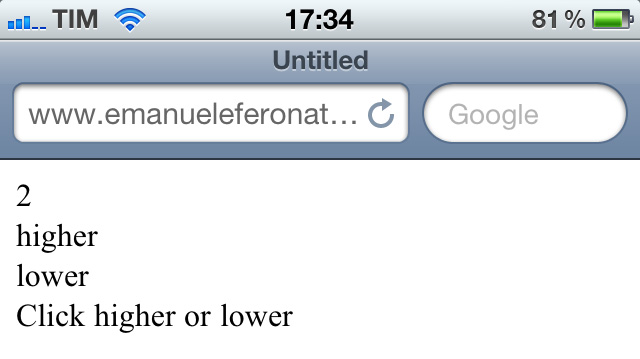
Much better now... and more playable since the "buttons" are bigger.
But it's obvious we won't go so far without a library designed with mobile devices in mind.
This is when jQuery Mobile comes into play. It's an unified user interface system across all popular mobile device platforms, built on the rock-solid jQuery and jQuery UI foundation, and that's what we need.
Now it's time to heavily change our html:
		Page Title


		higher
		lower


		Page Footer
Line 9: imports jQuery mobile stylesheet.
Line12: imports jQuery Mobile library. Both the library and the stylesheet can be downloaded from this page
Line 19: we are meeting our first data-role attribute. This will tell jQuery Mobile the role of the div in the mobile page. With data-role="page" we tell jQM it's the beginning of a mobile page.
Line 21: data-role="header" tells us we are working wit the header of the page.
Line 25: data-role="content" tells us we are working wit the content of the page.
Line 32: data-role="footer" tells us we are working wit the footer of the page.
Once the browser is pointed on the page, jQM automatically triggers all HTML5 data-role attributes to render the page with all necessary widgets. That's what we have now:
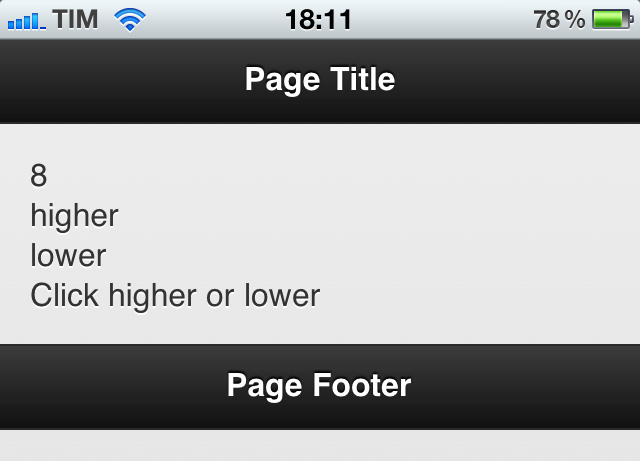
This is not that good yet, as the footer isn't at the bottom of the page but just when the page itself ends. To have the footer (and the header) fixed on the bottom (and on the top) of the page, change lines 21 and 32 respectively with:
and
and now your header and footer will be fixed at the very top and at the very bottom of the page, this way:

Anyway, we are greedy and we want our page to go in full screen mode, without showing the address bar at the top and the toolbar at the bottom.
This will be made in two steps: first, we have to insert this line between <head> and <\head>:
Then, we have to launch the web page from Home, that is the iPhone "desktop". Add the page to home: a custom icon will be generated with the thumbnail of the page:

and once you call it directly from the icon you will get your full page navigation.

The last thing we will see in this first part is how to create two mobile friendly buttons to control "higher" and "lower" guesses.
Change your content block this way:
Button divs have been changed to anchor texts with data-role="button". This will make jQuery Mobile render the links as buttons.
This is how the page looks now:

But to interact with them we have to change a bit the javascript changing lines 6 and 18 from respectively
$("#higher").click(function(){
and
$("#lower").click(function(){
to respectively
$("#higher").live("click tap",(function(){
and
$("#lower").live("click tap",(function(){
And finally you will be able to play again using the new buttons.
This is where this tutorial ends, but there's still a lot to do. During next step we'll build a preloader, save high scores and enhance the visual appeal of the game.
