Basic Circle Chain engine using StencylWorks
In my various attempts to port Circle Chain to iPhone I couldn’t forget to create the basic engine with StencylWorks, and as usual it was very easy.
Let me show how does it work. First, we need to create a scene and an actor, the green circle.
Since StencylWorks automatically adds Box2D physics to actors, we need to disable it:

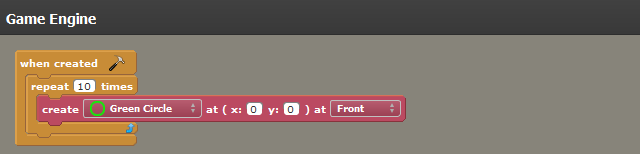
Then the scene behavior will just place ten green circles:
Finally, the behavior attached to the green circle actor will handle the entire movement, assigning to each circle a random position and a random direction and moving it around the screen:

And if you are running StencylWorks on a Mac, you can even test it in the official SDK simulator, as you can see here:
But testing is not over, I promise I’ll explore all possible ways to easily convert your Flash blockbusters into iPhone apps.
Stay tuned.
