Build 10 classic Flash games and learn game development along the way with this ultra-fast paced game development course.

If you love this blog, this is the book for you.

Buy the book

Get the source code of 12 commercial Flash games, which have been loaded more than 50 million times!

Learn from real world successful examples.

Get it now

Box2D for Flash Games teaches you how to make Flash physics games from scratch with the most advanced features.

Create the new Flash game smashing hit.

Buy the book

Circle Chain engine made with Game Maker

Today I am coming with a new version of my Circle Chain basic engine, this time made with YoYo GamesGame Maker, a tool which allows you to create games without knowing (that much) code and export them as Windows, Mac, iOS, Android and HTML5.

The promises of this software are enormous, although the interface is a bit dark:
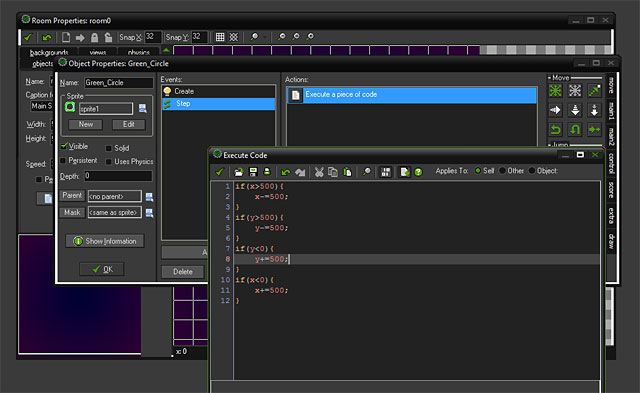
Anyway, with just a couple of lines I made the entire engine, thanks to built-in events like in most modern game making tools.

This is the creation of the level (called Room in Game Maker):

And this is how I check if green circles are inside the “room”:

And this is the final prototype, exported for HTML5:

I am happy to see more and more tools are coming to make game designers life easier, it will be a great battle, and soon I will make an huge comparison table among all of them.

Obviously more tutorials about Game Maker will come soon.

Rate this post: 1 Star2 Stars3 Stars4 Stars5 Stars (5 votes, average: 5.00 out of 5)
Loading ... Loading ...
Template monster proudly presents HTML Templates in order to meet its customers\' demands.
These HTML Templates can be easily edited with any HTML editor including the simplest one - Notepad.
They include .html files which makes them available for HTML editing.
Be my fan on Facebook and follow me on Twitter! Exclusive content for my Facebook fans and Twitter followers

This post has one comment

  1. Mig

    on September 16, 2012 at 12:01 am

    Hi. If you prefer a lighter interface there is some good news for you.

    You can change the Game Maker skin in file/preferences/general. It just needs a restart to become active. I think the bright skin (I selected) is GM8.

    cheers