Using RUBE (Really Useful Box2D Editor) in your Flash AS3 projects
I always follow with great interest iforce2d‘s tutorials because they are plenty of interesting ideas. I was inspired by one of such tutorials when I wrote Flying arrows simulation with Box2D and Box2D flying arrows engine – first attempt, so when I realized the author released a full featured Box2D editor called RUBE (Really Useful Box2D Editor) I absolutely wanted to try it.
Following my rule “no pointless reviews”, let me say RUBE is awesome, a must have if you are a Box2D developer. Fullstop.
Now, let me show you how to use it to improve our AS3 coding, since it does not export AS3 code, and it includes more features than the ones included in AS3 v2.1a version.
Although the editor is really powerful and fully documented allowing you to do in a few minutes stuff like this:
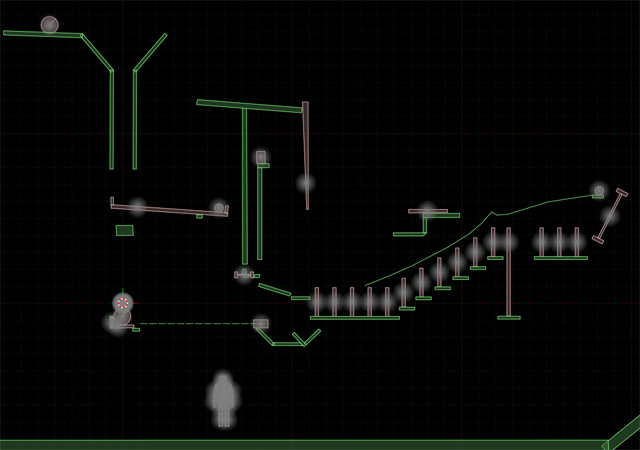
I’ll start with a simpler project, building the totem of the first level of Totem destroyer. Here is what I did with RUBE:

And once I export the world in JSON, everything is coded inside, from fixtures to world gravity, from body types to velocities, and so on.
This is the JSON I got from my totem:
{
   "allowSleep" : true,
   "autoClearForces" : true,
   "body" :
   [

      {
         "angle" : 0,
         "angularVelocity" : 0,
         "awake" : true,
         "fixture" :
         [

            {
               "density" : 1,
               "friction" : 0.2000000029802322,
               "name" : "fixture1",
               "polygon" :
               {
                  "vertices" :
                  {
                     "x" : [ 2.50, 2.50, -2.50, -2.50 ],
                     "y" : [ -1.0, 1.0, 1.0, -1.0 ]
                  }
               }
            }
         ],
         "linearVelocity" : 0,
         "massData-I" : 24.16666603088379,
         "massData-center" :
         {
            "x" : 1.937150884145922e-008,
            "y" : 2.980232283178452e-009
         },
         "massData-mass" : 10.0,
         "name" : "brick",
         "position" :
         {
            "x" : 10.66670036315918,
            "y" : 5.50
         },
         "type" : 2
      },

      {
         "angle" : 0,
         "angularVelocity" : 0,
         "awake" : true,
         "fixture" :
         [

            {
               "density" : 1,
               "friction" : 0.2000000029802322,
               "name" : "fixture1",
               "polygon" :
               {
                  "vertices" :
                  {
                     "x" : [ 2.0, 2.0, -2.0, -2.0 ],
                     "y" : [ -0.50, 0.50, 0.50, -0.50 ]
                  }
               }
            }
         ],
         "linearVelocity" : 0,
         "massData-I" : 5.666666507720947,
         "massData-mass" : 4.0,
         "name" : "brick",
         "position" :
         {
            "x" : 10.16670036315918,
            "y" : 4.0
         },
         "type" : 2
      },

      {
         "angle" : 0,
         "angularVelocity" : 0,
         "awake" : true,
         "fixture" :
         [

            {
               "density" : 1,
               "friction" : 0.2000000029802322,
               "name" : "fixture1",
               "polygon" :
               {
                  "vertices" :
                  {
                     "x" : [ 1.50, 1.50, -1.50, -1.50 ],
                     "y" : [ -0.50, 0.50, 0.50, -0.50 ]
                  }
               }
            }
         ],
         "linearVelocity" : 0,
         "massData-I" : 2.50,
         "massData-center" :
         {
            "x" : -7.450580596923828e-009,
            "y" : -2.483526939656144e-009
         },
         "massData-mass" : 3.0,
         "name" : "brick",
         "position" :
         {
            "x" : 10.66670036315918,
            "y" : 3.0
         },
         "type" : 2
      },

      {
         "angle" : 0,
         "angularVelocity" : 0,
         "awake" : true,
         "fixture" :
         [

            {
               "density" : 1,
               "friction" : 0.2000000029802322,
               "name" : "fixture1",
               "polygon" :
               {
                  "vertices" :
                  {
                     "x" : [ 2.50, 2.50, -2.50, -2.50 ],
                     "y" : [ -0.50, 0.50, 0.50, -0.50 ]
                  }
               }
            }
         ],
         "linearVelocity" : 0,
         "massData-I" : 10.83333301544190,
         "massData-center" :
         {
            "x" : 1.937150884145922e-008,
            "y" : 1.490116141589226e-009
         },
         "massData-mass" : 5.0,
         "name" : "brick",
         "position" :
         {
            "x" : 10.66666603088379,
            "y" : 2.0
         },
         "type" : 2
      },

      {
         "angle" : 0,
         "angularVelocity" : 0,
         "awake" : true,
         "fixture" :
         [

            {
               "density" : 1,
               "friction" : 0.2000000029802322,
               "name" : "fixture1",
               "polygon" :
               {
                  "vertices" :
                  {
                     "x" : [ 0.50, 0.50, -0.50, -0.50 ],
                     "y" : [ -0.50, 0.50, 0.50, -0.50 ]
                  }
               }
            }
         ],
         "linearVelocity" : 0,
         "massData-I" : 0.1666666716337204,
         "massData-mass" : 1,
         "name" : "brick",
         "position" :
         {
            "x" : 12.66666698455811,
            "y" : 1
         },
         "type" : 2
      },

      {
         "angle" : 0,
         "angularVelocity" : 0,
         "awake" : true,
         "fixture" :
         [

            {
               "density" : 1,
               "friction" : 0.2000000029802322,
               "name" : "fixture1",
               "polygon" :
               {
                  "vertices" :
                  {
                     "x" : [ 0.50, 0.50, -0.50, -0.50 ],
                     "y" : [ -0.50, 0.50, 0.50, -0.50 ]
                  }
               }
            }
         ],
         "linearVelocity" : 0,
         "massData-I" : 0.1666666716337204,
         "massData-mass" : 1,
         "name" : "brick",
         "position" :
         {
            "x" : 8.666660308837891,
            "y" : 1
         },
         "type" : 2
      },

      {
         "angle" : 0,
         "angularVelocity" : 0,
         "awake" : true,
         "fixture" :
         [

            {
               "density" : 1,
               "friction" : 0.2000000029802322,
               "name" : "fixture0",
               "polygon" :
               {
                  "vertices" :
                  {
                     "x" :
                     [
                        10.66666984558106,
                        -10.66666030883789,
                        -10.66666030883789,
                        10.66663932800293
                     ],
                     "y" : [ 0.50, 0.50, -0.50, -0.50 ]
                  }
               }
            }
         ],
         "linearVelocity" : 0,
         "name" : "ground",
         "position" :
         {
            "x" : 10.66666030883789,
            "y" : 0
         },
         "type" : 0
      }
   ],
   "continuousPhysics" : true,
   "gravity" :
   {
      "x" : 0,
      "y" : -10.0
   },
   "positionIterations" : 3,
   "stepsPerSecond" : 60.0,
   "subStepping" : false,
   "velocityIterations" : 8,
   "warmStarting" : true
}
Now it’s time to import the JSON in our AS3 class, decode it and build the Box2D world out of it. Since this is just an example, I am retrieving only body types, positions and fixtures, but obviously you can build the whole world.
Before you start, download and install Mike Chamber’s as3corelib which offers a great JSON support.
This is the commented script:
package {
	import flash.display.Sprite;
	import flash.events.Event;
	import flash.net.URLLoader;
	import flash.net.URLRequest;
	// JSON library
	import com.adobe.serialization.json.JSON;
	import Box2D.Dynamics.*;
	import Box2D.Collision.*;
	import Box2D.Collision.Shapes.*;
	import Box2D.Common.Math.*;
	import Box2D.Dynamics.Contacts.*;
	public class Main extends Sprite {
		private var worldScale:Number=30;
		private var world:b2World=new b2World(new b2Vec2(0,10),true);
		public function Main() {
			debugDraw();
			// loading the JSON file
			var urlReq:URLRequest=new URLRequest("totem.json");
			var urlLoader:URLLoader=new URLLoader(urlReq);
			// once read, the core of the script is JSONLoaded function
			// which will render the Box2D world
			urlLoader.addEventListener(Event.COMPLETE, JSONLoaded);
			addEventListener(Event.ENTER_FRAME, update);
		}
		private function JSONLoaded(e:Event):void {
			// jsonData string holds the content of totem.json file
			var JSONData:String=String(e.target.data);
			// converting the string into a JSON object
			var JSONObject:Object=JSON.decode(JSONData);
			// looping through all JSON->body array
			for (var i:Number=0; iposition->x and i-th body->position->y
				var pX:Number=bodyObject.position.x;
				var pY:Number=bodyObject.position.y;
				// same thing for the vertices
				var verticesX:Array=bodyObject.fixture[0].polygon.vertices.x;
				var verticesY:Array=bodyObject.fixture[0].polygon.vertices.y;
				// I have to push the vertices into a vector because every polygon is defined
				// by a series of vertices even if is just a box
				var points:Vector.=new Vector.();
				for (var j:Number=0; j
And this is the result:

The totem is done in just a few lines of code, but obviously the most interesting thing is I would have been able to build a totem made by 1000 bricks in exactly the same amount of lines.
Download the source code with all required libraries. I am also going to create a RUBE to AS3 class to have the ultimate Box2D editor.
