

“Hundreds” Flash game prototype using Box2D
Talking about Hundreds game, Actionscript 3, Box2D, Flash and Game development.
Did you play iOS Hundreds game? It’s basically the remake of Hundreds Flash game which wasn’t made with Box2D as far as I can see from the way it handles collisions, so we are going to improve it with the power of Box2D.
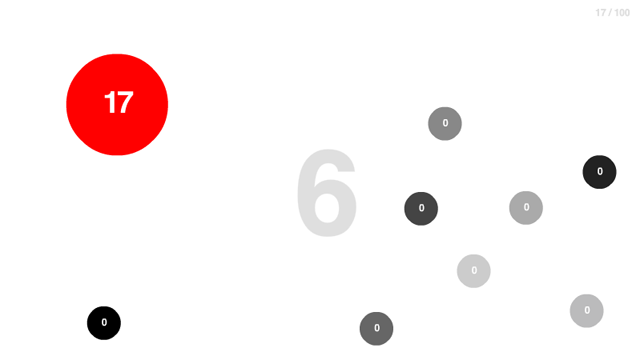
The aim of the game is simple: make the ball numbers increase to reach a hundred by touching it with the mouse. Do not grow balls when they touch each other.
In this first step, the game features are:
* There are a number of circles moving at a constant speed and colliding each other
* You can make a circle grow by touching it with the mouse
The prototype uses concepts we have already seen in other games, check the Filler Box2D prototype to make Box2D bodies move at a constant speed and the new Way of an Idea prototype to detect bodies under the mouse.
Here is the code:
package {
	import flash.display.Sprite;
	import flash.events.Event;
	import Box2D.Dynamics.*;
	import Box2D.Collision.*;
	import Box2D.Collision.Shapes.*;
	import Box2D.Common.Math.*;
	public class Main extends Sprite {
		private var world:b2World=new b2World(new b2Vec2(0,0),true);
		private var worldScale:Number=30;
		// speed of circles
		private var circleSpeed:Number=5;
		public function Main() {
			debugDraw();
			// adding 10 random circles
			for (var i:Number=1; i<=10; i++) {
				addCircle();
			}
			// adding boundary walls
			addWall(320,0,640,10);
			addWall(320,480,640,10);
			addWall(0,240,10,480);
			addWall(640,240,10,480);
			addEventListener(Event.ENTER_FRAME,update);
		}
		private function debugDraw():void {
			var debugDraw:b2DebugDraw=new b2DebugDraw();
			var debugSprite:Sprite=new Sprite();
			addChild(debugSprite);
			debugDraw.SetSprite(debugSprite);
			debugDraw.SetDrawScale(worldScale);
			debugDraw.SetFlags(b2DebugDraw.e_shapeBit|b2DebugDraw.e_jointBit);
			debugDraw.SetFillAlpha(0.5);
			world.SetDebugDraw(debugDraw);
		}
		private function addCircle():void {
			var bodyDef:b2BodyDef= new b2BodyDef();
			bodyDef.type=b2Body.b2_dynamicBody;
			bodyDef.position.Set(Math.round(Math.random()*600+20)/worldScale,Math.round(Math.random()*440+20)/worldScale);
			bodyDef.userData={name:"sphere"};
			var circleShape:b2CircleShape = new b2CircleShape(10/worldScale);
			var fixtureDef:b2FixtureDef = new b2FixtureDef();
			fixtureDef.density=1;
			fixtureDef.friction=0;
			fixtureDef.restitution=0.5;
			fixtureDef.shape=circleShape;
			var body:b2Body=world.CreateBody(bodyDef);
			body.CreateFixture(fixtureDef);
			// giving the circle a random direction
			var randomAngle:Number=Math.random()*2*Math.PI;
			body.SetLinearVelocity(new b2Vec2(circleSpeed*Math.cos(randomAngle),circleSpeed*Math.sin(randomAngle)));
		}
		private function addWall(pX:Number,pY:Number,w:Number,h:Number):void {
			var bodyDef:b2BodyDef=new b2BodyDef();
			bodyDef.position.Set(pX/worldScale,pY/worldScale);
			var polygonShape:b2PolygonShape=new b2PolygonShape();
			polygonShape.SetAsBox(w/2/worldScale,h/2/worldScale);
			var fixtureDef:b2FixtureDef=new b2FixtureDef();
			fixtureDef.shape=polygonShape;
			fixtureDef.density=1;
			fixtureDef.restitution=0.5;
			fixtureDef.friction=0;
			var theWall:b2Body=world.CreateBody(bodyDef);
			theWall.CreateFixture(fixtureDef);
		}
		// the core of the script, looking for the body touched and
		// increasing the size of the circle shape
		private function queryCallback(fixture:b2Fixture):Boolean {
			var touchedBody:b2Body=fixture.GetBody();
			if (touchedBody.GetUserData()!=null) {
				var fixture:b2Fixture=touchedBody.GetFixtureList();
				var circleDef:b2CircleShape=fixture.GetShape() as b2CircleShape;
				var radius:Number=circleDef.GetRadius();
				// setting a max radius of 50 pixels for gameplay purpose
				if (radius<50/worldScale) {
					circleDef.SetRadius(radius+1/worldScale);
				}
			}
			return false;
		}
		private function update(e:Event):void {
			world.Step(1/30,10,10);
			world.ClearForces();
			for (var b:b2Body=world.GetBodyList(); b; b=b.GetNext()) {
				if (b.GetUserData()!=null) {
					// keep moving circles at a constant speed
					var velocity:b2Vec2=b.GetLinearVelocity();
					var speed:Number=velocity.Length();
					var ratio:Number=circleSpeed/speed;
					velocity.Multiply(ratio);
					b.SetLinearVelocity(velocity);
				}
			}
			// checking for bodies under the mouse
			world.QueryPoint(queryCallback,new b2Vec2(mouseX/worldScale,mouseY/worldScale));
			world.DrawDebugData();
		}
	}
}
In this prototype there is a limit to circle growth because I still have to check for collisions and I don't want circles to get bigger than the screen. This is the result:
Move the mouse over a circle to make it grow.
Next time, the complete prototype with the count to 100 and the collision management.
Never miss an update! Subscribe, and I will bother you by email only when a new game or full source code comes out.